Canaan Avalon Q in Home Assistant
The Avalon Q is a higher-performance bitcoin miner suitable for larger heating applications, producing ~5,630 BTU/hr at full power.
Before You Start
Two steps before adding this miner to Home Assistant:
-
Set up your miner with the Avalon Home App - Configure WiFi or ethernet and get your miner’s IP address. Download from Canaan.
-
Install the Exergy Canaan integration - Follow the Canaan Avalon Home Integration guide to install via HACS and add your miner.
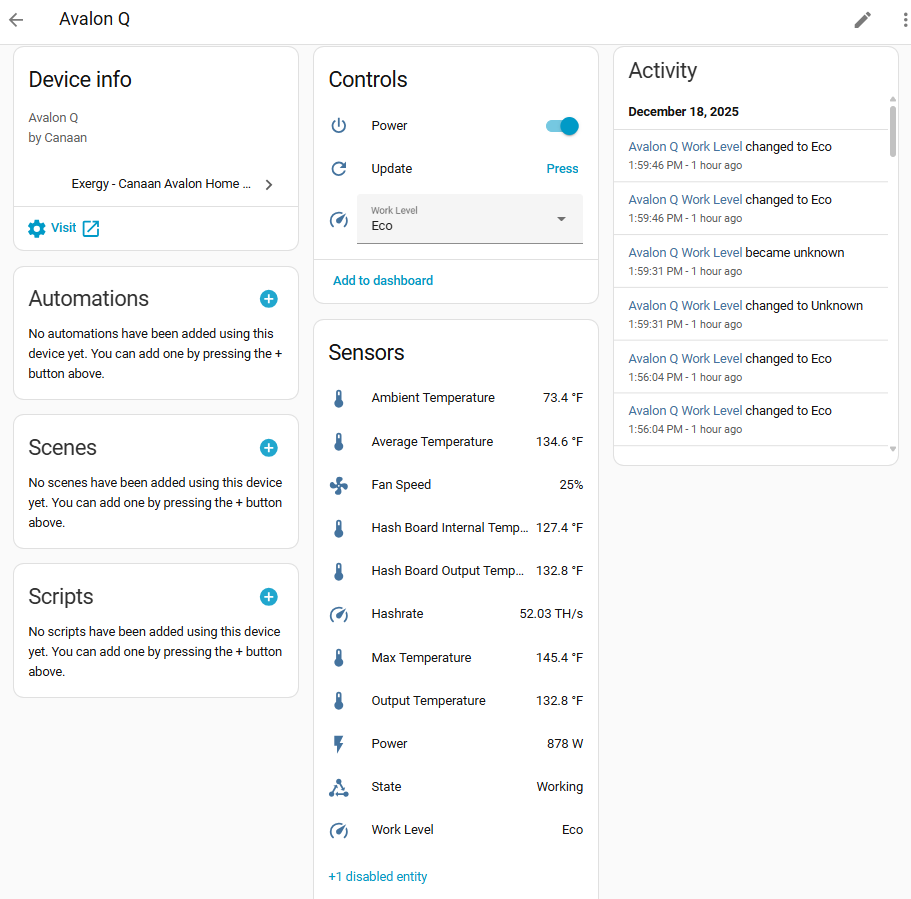
Once both are complete, your Avalon Q will appear in Home Assistant with the sensors and controls below.
Specifications
| Spec | Value |
|---|---|
| Hashrate | ~90 TH/s (varies by level) |
| Power | ~1,650W |
| Heat Output | ~5,630 BTU/hr |
| Noise Level | ~65 dB |
| Dimensions | 400 x 200 x 290mm |
| Weight | ~12 kg |
Work Levels
The Avalon Q supports three performance levels:
Super
- ~1,700W power consumption
- Maximum heat output
- Full fan speed
- Highest hashrate
Standard
- ~1,300W power consumption
- Balanced performance
- Slightly reduced fan speed
- Medium hashrate
Eco
- ~800W power consumption
- Reduced noise
- Lower fan speeds
- Lower hashrate and heat output
Home Assistant Entities
Sensors
| Sensor | Entity Example | Description |
|---|---|---|
| Ambient Temperature | sensor.avalon_q_ambient_temperature | Intake air temp |
| Output Temperature | sensor.avalon_q_output_temperature | Exhaust air temp |
| Hashboard Temperature | sensor.avalon_q_hash_board_temperature | Internal chip temp |
| Hashrate | sensor.avalon_q_hashrate | Current TH/s |
| Power | sensor.avalon_q_power | Current wattage |
| Fan Speed | sensor.avalon_q_fan_speed | Fan RPM % |
| Device State | sensor.avalon_q_state | Operating status |
| WiFi Signal | sensor.avalon_q_wifi_signal | WiFi signal strength (disabled by default) |
Note: The WiFi Signal sensor is disabled by default. Enable it via Settings > Devices & Services > Exergy Canaan > [device] > Entities and click the disabled entity to enable.
Controls
| Control | Entity Example | Options |
|---|---|---|
| Power | switch.avalon_q_power | On/Off |
| Work Level | select.avalon_q_work_level | Eco, Standard, Super |
| Reboot | button.avalon_q_reboot | Trigger reboot |
Heating Capacity
The Avalon Q produces approximately 5,630 BTU/hr at full power, comparable to a large space heater or small HVAC system.
Suitable for:
- Large room heating (400-800 sq ft)
- Basement or garage heating
- HVAC duct integration
Considerations:
- Requires 15A dedicated circuit
- Higher noise level than Mini 3
- Significant heat output
HVAC Integration
The Avalon Q is well-suited for integration with existing HVAC systems:
- Output can be ducted into supply plenum
- Acts as “Stage 1” heating with fossil fuel as “Stage 2”
- Requires proper airflow management
See HVAC Integrated Thermostat Control for automation setup and HVAC Dashboard for a matching interface.
What’s Next?
Automate Your Heating
- HVAC Integrated Control - Whole-home thermostat integration
- Space Heater Control - Standalone room heating
- Time-of-Use Control - Optimize around electricity rates
Build a Dashboard
- HVAC Dashboard - Thermostat + stage indicators
- Upstairs Example - Real Avalon Q + furnace setup