Canaan Avalon Mini 3 in Home Assistant
The Avalon Mini 3 is a compact bitcoin miner designed for home heating applications, producing ~2,900 BTU/hr at full power.
Before You Start
Two steps before adding this miner to Home Assistant:
-
Set up your miner with the Avalon Home App - Configure WiFi and get your miner’s IP address. Download from Canaan.
-
Install the Exergy Canaan integration - Follow the Canaan Avalon Home Integration guide to install via HACS and add your miner.
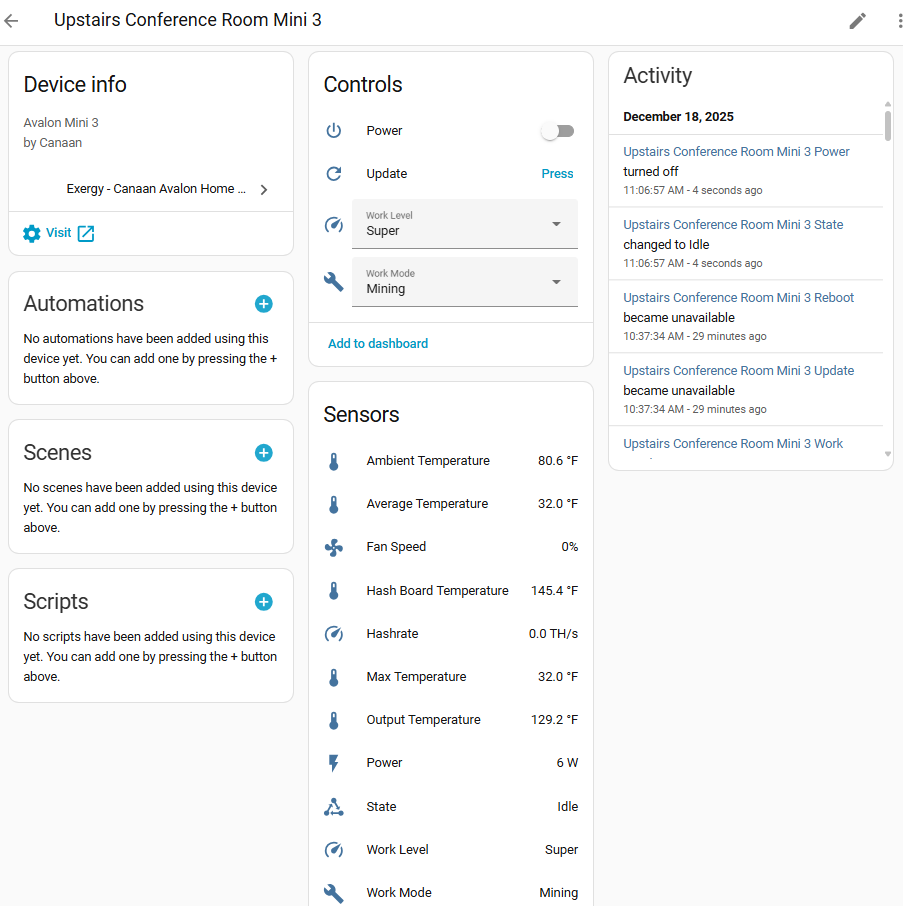
Once both are complete, your Mini 3 will appear in Home Assistant with the sensors and controls below.
Specifications
| Spec | Value |
|---|---|
| Hashrate (Super) | ~37 TH/s |
| Hashrate (Eco) | ~28 TH/s |
| Power (Super) | ~850W |
| Power (Eco) | ~450W |
| Heat Output (Super) | ~2,900 BTU/hr |
| Heat Output (Eco) | ~1,536 BTU/hr |
| Noise Level | ~50 dB (Eco mode) |
| Dimensions | 300 x 140 x 195mm |
| Weight | ~5.5 kg |
Work Modes
The Mini 3 supports three operating modes:
Heating Mode
- Optimized for heat output
- Full fan speed for maximum air circulation
- Consistent hashrate
- Turns off at the temperature limit set in the Avalon Home App
Mining Mode
- Optimized for hashrate/efficiency
- Standard operation
- Operates independent of temperature limit
Night Mode
- Reduced noise operation
- Lower fan speeds
- Reduced hashrate and heat output
- Turns off miner display screen
Work Levels
Eco
- Reduced power consumption (~450W)
- Lower heat output (~1,536 BTU/hr)
- Quieter operation
- Lower hashrate (~28 TH/s)
Super
- Maximum performance
- Full power consumption (~850W)
- Maximum heat output (~2,900 BTU/hr)
- Highest hashrate (~37 TH/s)
Home Assistant Entities
Sensors
| Sensor | Entity Example | Description |
|---|---|---|
| Ambient Temperature | sensor.avalon_mini_3_ambient_temperature | Intake air temp |
| Output Temperature | sensor.avalon_mini_3_output_temperature | Exhaust air temp |
| Hashboard Temperature | sensor.avalon_mini_3_hash_board_temperature | Internal chip temp |
| Hashrate | sensor.avalon_mini_3_hashrate | Current TH/s |
| Power | sensor.avalon_mini_3_power | Current wattage |
| Fan Speed | sensor.avalon_mini_3_fan_speed | Fan RPM % |
| Device State | sensor.avalon_mini_3_state | Operating status (Idle/Initializing/Working/Fault) |
| Work Level | sensor.avalon_mini_3_work_level | Current level (Super/Eco) |
| Work Mode | sensor.avalon_mini_3_work_mode | Current mode (Mining/Heating/Night) |
| WiFi Signal | sensor.avalon_mini_3_wifi_signal | WiFi signal strength (disabled by default) |
Note: The WiFi Signal sensor is disabled by default. Enable it via Settings > Devices & Services > Exergy Canaan > [device] > Entities and click the disabled entity to enable.
Controls
| Control | Entity Example | Options |
|---|---|---|
| Power | switch.avalon_mini_3_power | On/Off |
| Work Mode | select.avalon_mini_3_work_mode | Heating, Mining, Night |
| Work Level | select.avalon_mini_3_work_level | Eco, Super |
| Update | button.avalon_mini_3_update | Trigger manual sensor update |
| Reboot | button.avalon_mini_3_reboot | Trigger reboot |
Heating Capacity
The Mini 3 produces approximately 2,900 BTU/hr at full power, comparable to a medium-sized space heater.
Suitable for:
- Single room heating (200-400 sq ft)
- Supplemental heating in larger spaces
- Home office or bedroom
Not suitable for:
- Whole-home heating (single unit)
- Spaces requiring silent operation
What’s Next?
Automate Your Heating
- Space Heater Thermostat Control - Temperature-controlled operation
- Time-of-Use Control - Optimize around electricity rates
Build a Dashboard
- Space Heater Dashboard - Thermostat-style interface with mining stats